For anyone with Guitar Pro files
From Guitar Pro to Maestro
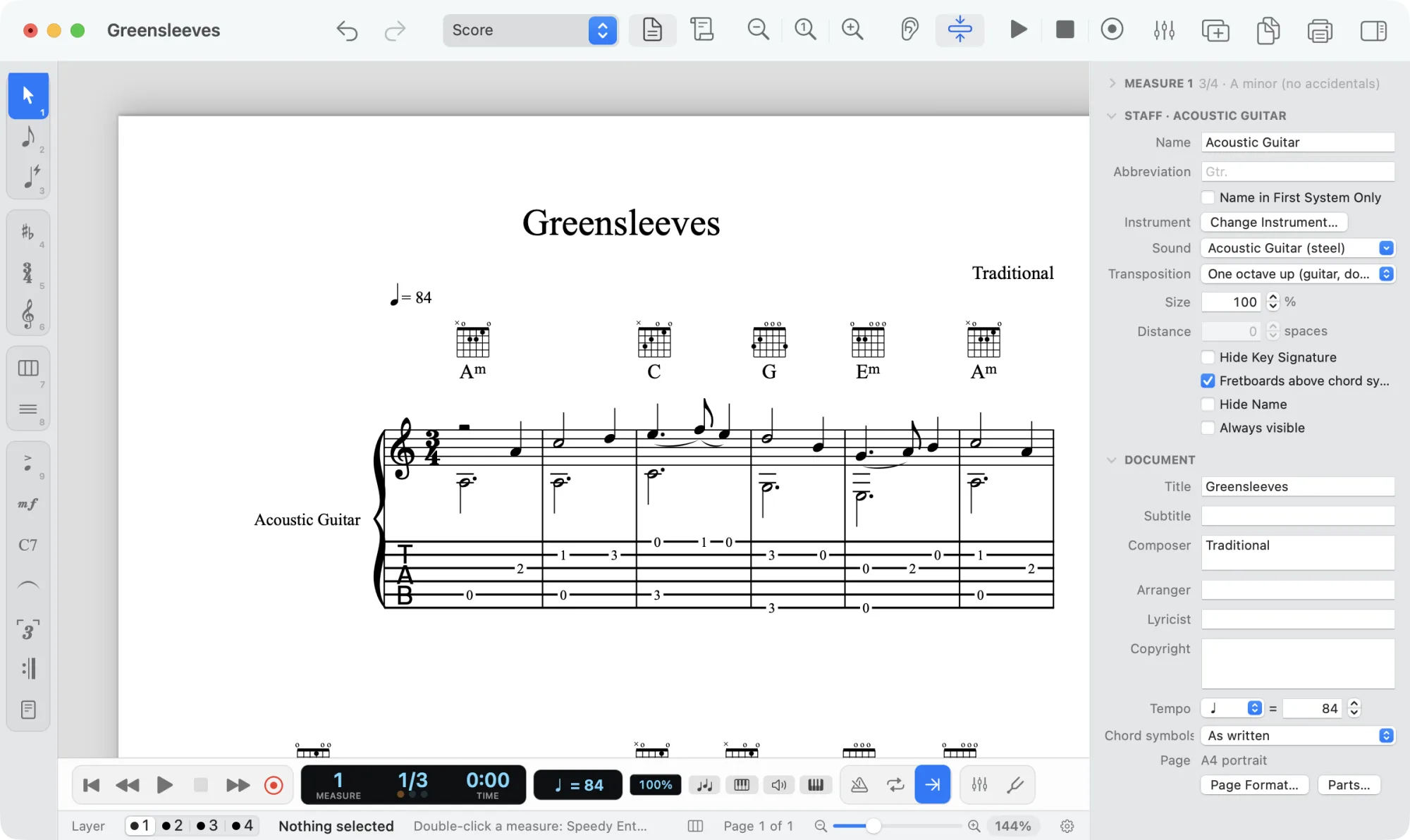
Maestro opens Guitar Pro files, from Guitar Pro 3 to Guitar Pro 8: each track becomes notation with tablature below, with the file’s strings, frets, tuning and capo. Then you print it, play it back, arrange it for other instruments or take it to Finale, MuseScore and Dorico. And it’s free, for Mac and Windows.
In three steps
Bring your songs into Maestro.
- 1
Download Maestro
For Mac (macOS 13 Ventura or later) or Windows 10 and 11. It’s free, with no limits and no account.
- 2
Open the Guitar Pro file
With File → Open…, or by dragging it onto the window: .gp3, .gp4, .gp5, .gpx from Guitar Pro 6 and .gp from Guitar Pro 7 and 8. You don’t need Guitar Pro installed.
- 3
Check and save
If an effect in the file has no equivalent in Maestro, it tells you right away. Then save the song as a Maestro document (.maestro).
Lots of files? File → Export → Convert to MusicXML… converts them all at once, even whole folders.
Where to find things
What you used in Guitar Pro, in Maestro.
Maestro is a notation program for every instrument and follows Finale’s habits; for guitar it has tablature, a virtual neck and chord diagrams. On Windows ⌘ and ⌃ become Ctrl, ⌥ becomes Alt.
From the Guitar Pro file
What comes across, and what to check.
Maestro reads every track in the file, with the strings and frets written in Guitar Pro, and guitar effects become Maestro’s closest markings. Whatever it can’t import, it lists in a notice as soon as the file is open.
Comes into the score
- Every track, with notation and tablature below, as Guitar Pro shows it
- Strings, frets, tuning and capo of each track
- Notes, chords, rests, voices, tuplets and grace notes
- Hammer-ons and pull-offs, slides, dead notes, harmonics, strokes and tremolo picking
- Bends, palm mute, let ring, vibrato, tapping and slap, written above the staff as in Guitar Pro
- Chord symbols, dynamics, tempo changes, octave lines and fermatas
- Repeats with alternate endings, segno, coda and jumps
- Lyrics, piano on two staves and drums
- Title, credits and copyright
Worth checking
- Bends are written as text above the staff (“bend full”), not as a curve in the tablature.
- Fade in, rasgueado, double segno and double coda have no equivalent in Maestro: the notice tells you if the file has any.
- The file’s chord diagrams don’t come across: the chord symbols do, and Maestro builds the diagrams from them.
- The song plays with Maestro’s sounds or your own SoundFonts, not with Guitar Pro’s RSE engine.
- Beaming, spacing and layout follow Maestro’s rules, not Guitar Pro’s.
Frequently asked questions
Before you start.
Do I need Guitar Pro installed?
No. Maestro reads .gp3, .gp4, .gp5, .gpx and .gp files on its own, even on a computer that has never had Guitar Pro.
Can I turn a Guitar Pro file into a PDF or MusicXML?
Yes: open it and use File → Export, which has PDF, MusicXML, MIDI, audio and Finale (.musx). For many files at once there’s Convert to MusicXML… in the same menu.
Can I save in Guitar Pro format?
No: Maestro saves in its own format (.maestro). To take a song back to Guitar Pro, use File → Export → Export MusicXML… and import the file in Guitar Pro.
Does it work with a screen reader?
Yes, with VoiceOver on the Mac and NVDA on Windows. On tablature, and on notation with tablature below it, it also says the string and fret of each note, for example “G 4 quarter note, string 1 fret 3” or “string 3 open”.
Does it work on Windows too?
Yes. Guitar Pro files open the same way on Mac and Windows, and a score saved on one opens on the other.
Is Maestro really free?
Yes, with no limits, no subscription and no account. It updates itself when a new version comes out.
Open your first Guitar Pro file.
Download Maestro, open a .gp, .gpx or .gp5 file and find the notation and tablature ready.